
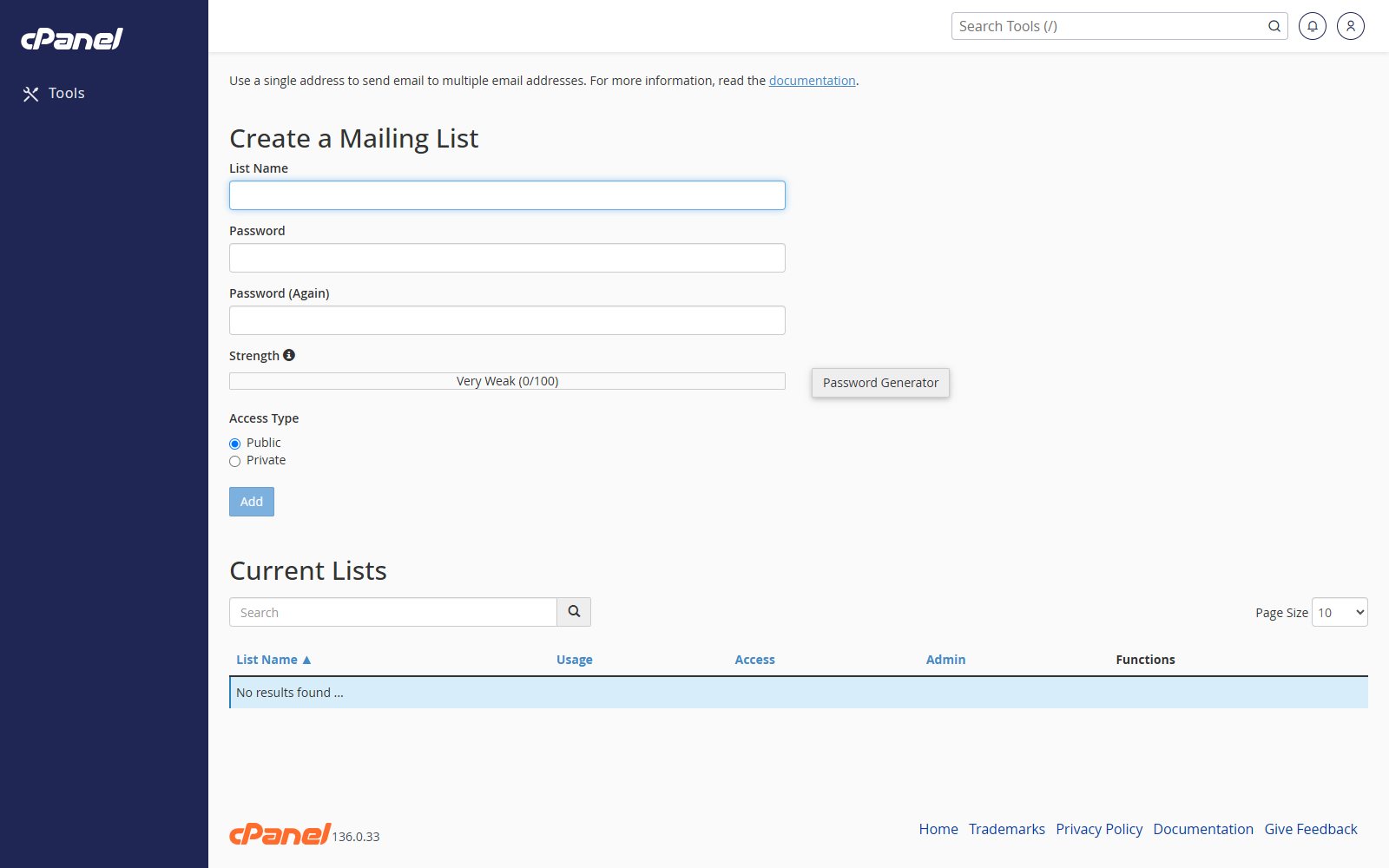
Create a Mailing List
- Log in to cPanel.
- Go to Email > Mailing Lists.
- Enter the list name.
- Choose the domain.
- Enter and confirm the list password.
- Choose whether the list is Public or Private.
- Click Add.
Manage a Mailing List
- Go to Email > Mailing Lists.
- Find the list in Current Lists.
- Click Manage.
- Sign in to the Mailman interface if prompted.
- Make the changes you need.
Change the Mailing List Password
- Go to Email > Mailing Lists.
- Find the list.
- Click Change Password.
- Enter and confirm the new password.
- Click Change Password.
Delegate Mailing List Administration
- Go to Email > Mailing Lists.
- Find the list.
- Click Delegation.
- Select the users under Available Users.
- Move them to List Administrators.
- Click Save.
Delete a Mailing List
- Go to Email > Mailing Lists.
- Find the list.
- Click Delete.
- Click Delete Mailing List to confirm.
Notes
- A public list can be subscribed to more openly than a private list.
- Deleting a mailing list removes the list from cPanel.